How to catalogue a CD collection on Android
Whether you have a few dozen CDs or thousands of releases, a useful music catalogue should answer three questions: What do I own? Which edition is it? Where can I find it? Here's a practical way to build one using your phone.
Rather than typing every title into a spreadsheet, use barcodes, release databases and your own copy-level notes. You can start without buying a dedicated barcode scanner: an Android phone camera is enough to identify many CDs. Keep in mind that automatic results still need checking, especially for reissues and rare pressings.
1. Decide what you want to record
Begin with a consistent set of fields. For each CD, keep at least the artist, album title, physical format, edition or catalogue number, year, condition and physical shelf location. Useful extras include a barcode (EAN or UPC), purchase price, personal notes and whether the copy is currently on loan or for sale.
- Release details: artist, title, record label, catalogue number, country and year.
- Your individual copy: media condition, sleeve condition, purchase details, notes and storage location.
- Personal management: favourite status, loan records, wishlist and sale status.
The distinction between a music release and the actual copy you own matters. Two collectors might own the same release while their discs have different conditions, prices and histories.
2. Scan CD barcodes with the phone camera
Look for the barcode on the rear inlay or outer packaging. Open the scanning function in Collexall, frame the full code and allow the phone to read it. Barcode recognition can take place on the device, but retrieving album metadata from online catalogues requires a connection.
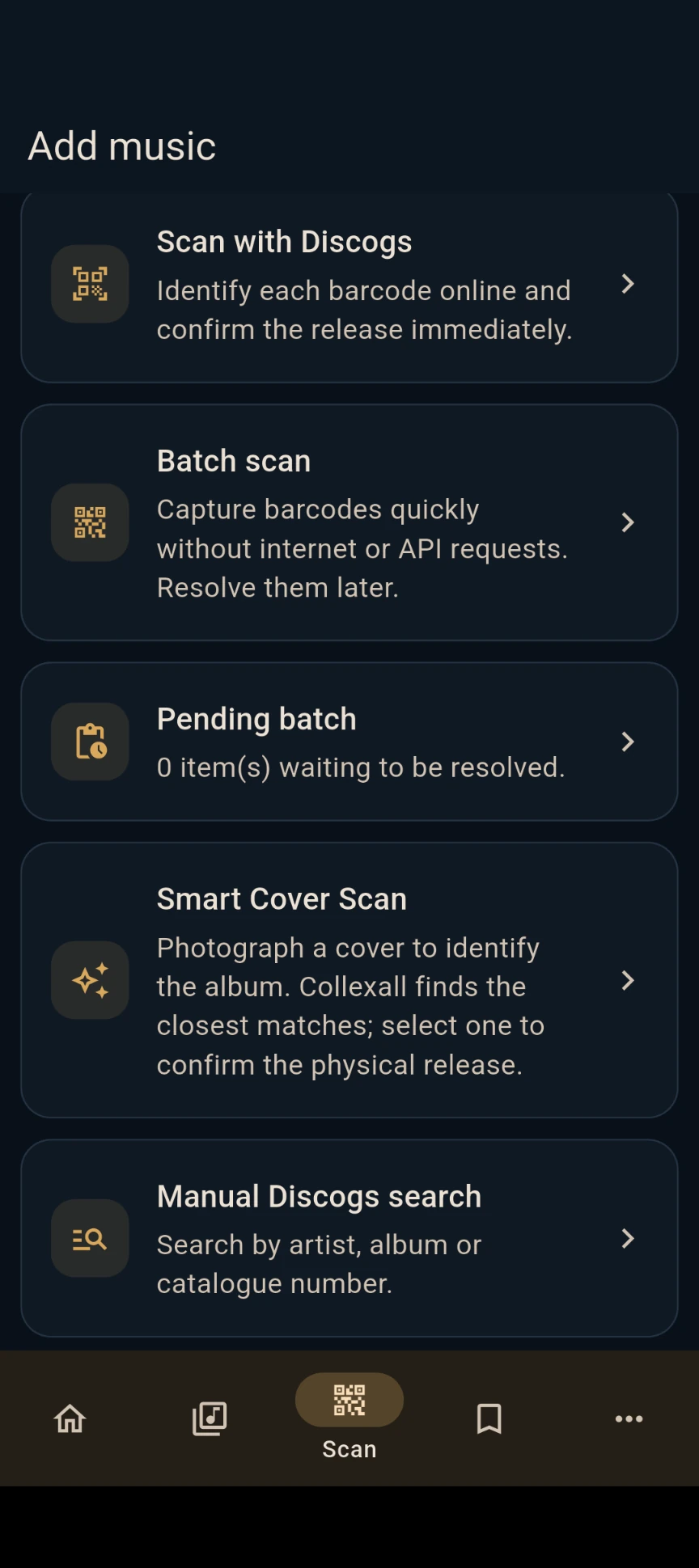
If you are processing a shelf, work systematically in batches. Keep the discs in their original order while scanning and note the shelf location before moving on. An offline capture queue is useful if network coverage is poor; confirm metadata later when connected.
3. Verify the exact CD edition
A barcode search is a starting point, not a guarantee of a particular pressing. Reissues and regional variants sometimes share barcodes. Confirm the record label, catalogue number, year, country, packaging and any visible edition identifiers. If the barcode returns more than one result, compare the release information with the physical disc.
Collexall integrates with Discogs for music-release data, and manual search remains useful when a barcode is damaged or missing. For hard-to-identify editions, you can also inspect the cover, spine and disc matrix information yourself before choosing a record.
4. Organise shelves and storage locations
The biggest practical advantage of a catalogue is often being able to find a disc again. Choose a system you can follow consistently: for example, Room → Shelf unit → Shelf. Physical locations are more useful than relying only on a long alphabetic list.
- Give shelves simple labels such as Living room / Unit B / Shelf 3.
- Group discs in a way that suits the collection: artist, genre, decade or label.
- Record the location when adding an item, not months later.
- Update it when reorganising the collection.
5. Track condition, loans and possible sales
Cataloguing is more than saving album titles. Record whether the CD and packaging are in good condition, who borrowed a copy and whether you might sell it. For rare editions, keep personal notes that make identification easier in the future.
When looking at market values, distinguish asking prices on active listings from completed sale prices. Neither represents a guaranteed value for your exact copy. Condition, edition accuracy, seller location and shipping costs can all affect a comparison.
6. Back up the collection and review it regularly
A catalogue takes time to build, so make it portable. Collexall supports CSV export and import, useful for reviewing or editing items in a spreadsheet, as well as JSON backup and restore. Store backups somewhere safe and check them periodically, especially before changing phones or performing large edits.
For larger collections, divide the work into manageable sessions. You might scan one shelf a day, review ambiguous releases at the end of each session and export a backup after every significant update. This is usually more reliable than trying to catalogue everything in one sitting.
Common questions
Do I need a separate barcode scanner?
No. Collexall uses the Android phone camera. A specialist scanner is not necessary for ordinary cataloguing.
Can I catalogue CDs without a barcode?
Yes. Search by artist and album, or use cover recognition to help find candidates. Check edition information before saving the result.
Does Collexall require a Discogs account?
No. An account connection is optional. Some online metadata features may still use Discogs searches without account synchronisation.
Can I try the app before purchasing?
Yes. The Android app can be installed free and used for up to 20 items. Unlimited cataloguing is unlocked through an optional one-time in-app purchase.
Start cataloguing your collection
Collexall is free for your first 20 items. When you need more space, you can unlock unlimited collecting with an optional one-time purchase inside the app.
Install free on Google Play